
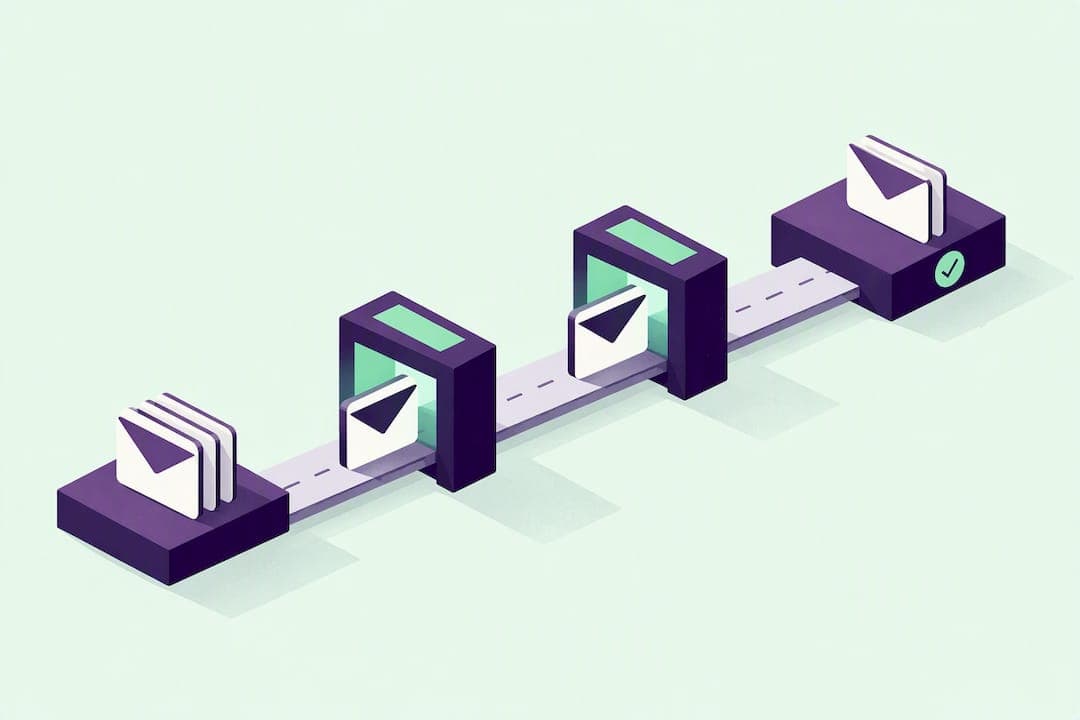
An order confirmation email is the automated message a store sends the moment a customer completes checkout, confirming what they bought, what it costs, and what happens next. The single rule that matters most: send it immediately, with the order number and a primary call to action visible without scrolling. Everything else in this guide is detail work in service of that one requirement.
TL;DR:
- Sending order confirmation emails must include the order ID and total upfront, since they are the most immediately visible details for support and customers.
- The email should contain an itemized list with product images, SKU, quantity, and unit price, along with a full price breakdown including subtotal, discounts, tax, and shipping.
- It is critical to trigger the email immediately upon order placement, using real-time webhooks or event-based systems, to prevent customer doubt and support inquiries.
- Proper domain authentication through SPF, DKIM, and DMARC ensures high deliverability and prevents the email from ending up in spam folders.
- Localization of currency, date formats, address styles, and support contact details significantly improves trust and clarity for international customers.
Table of Contents
- What Belongs in Every Order Confirmation Email
- Designing an Order Confirmation That Works on Any Screen
- The Deliverability Checklist Developers Can't Skip
- Confirmation, Receipt, or Shipping Notice: Sending the Right Message at the Right Time
- Why Open Rate Lies to You About Confirmation Emails
- Order Confirmation Templates You Can Adapt Today
- Testing and Troubleshooting Before Problems Reach Customers
- Personalizing Confirmations Without Overdoing It
- Localizing Confirmations for International Customers
- Connecting Confirmations to Your Order Management and CRM
- An Editorial Take on Speed, Clarity, and Deliverability
- Sending Order Confirmations Without Building Your Own Infrastructure
- Sources
- FAQ
What Belongs in Every Order Confirmation Email
A confirmation email has one job: let the customer answer "what did I buy, where's it going, and what happens next" without opening a support ticket. That framing comes straight from research on ecommerce communication patterns, and it's a useful filter for every field you're deciding whether to include, as shown by tools like Tineo that read and organize confirmation emails efficiently.
Here's the checklist that covers the essentials:
- Order ID and timestamp — the order number needs to be visible, not buried three paragraphs down, since it's the first thing a support agent will ask for.
- Itemized summary — product name, SKU, thumbnail image, quantity, and unit price for every line item.
- Full price breakdown — subtotal, any discount applied, tax, shipping cost, and the grand total, in that order.
- Payment method, masked — "Visa ending in 4242," never the full card number, and never the CVV under any circumstance.
- Billing and shipping addresses, plus a phone number if delivery requires signature or coordination.
- One primary CTA — "View Order" or "Track Order," styled as a button, not a text link buried in a paragraph.
- Support contact info — an email address or link that goes to a real human, not a no reply black hole.
- Returns and refund policy link — even a single sentence with a link satisfies this.
- A brief privacy or security note — reassurance that the order data is handled securely builds trust without turning the email into a legal document.
The order in which you place these matters as much as whether they're present. Mobile inboxes render roughly the first 100 to 150 characters of an email in the preview pane, so the order number and total need to appear before a reader ever taps to open. A practical structure that vendors and researchers converge on runs: recognizable sender name, clear subject line, preheader, success heading, order number and date, itemized summary, transparent price breakdown, delivery window, one primary action, support contact, and a concise returns link.
One detail teams miss: if a product title fails to load from your catalog feed (a common issue with delayed inventory syncs), the template needs a fallback string like "Item details unavailable" rather than rendering a blank line or a broken variable tag. The same applies to currency formatting. Render numbers in a locale-safe way so €1.234,56 doesn't appear as $1,234.56 to a customer in Germany.
Designing an Order Confirmation That Works on Any Screen
Most order confirmation emails get opened on a phone within minutes of purchase, often before the customer has even put their phone down. That means design decisions that look fine on a widescreen monitor can quietly sabotage the message on the device that matters most.
Subject lines and preheaders do more work than most marketers give them credit for. "Your order #48213 is confirmed" beats "Thanks for your order!" because it's searchable. Customers search their inbox for order numbers constantly, especially when following up on a return.
- Use a single-column layout that stacks cleanly on small screens instead of a multi-column desktop grid that gets squeezed.
- Set body text at 14 to 16 pixels minimum, and make CTA buttons at least 44 pixels tall so they're tappable with a thumb.
- Write a plain-text version alongside the HTML version. Some corporate spam filters and older clients still strip HTML entirely.
- Add meaningful alt text to product images ("Blue ceramic mug, quantity 2") so the email still communicates when images are blocked by default, which happens in a large share of inboxes.
- Keep heading order logical (H1 for the success message, H2 for order details) so screen readers can navigate the email the way they navigate a webpage.
Resist the urge to load the confirmation with upsells. If you add a "you might also like" module or a loyalty prompt, place it below the fold, after every confirmation detail, never above it. The customer opened this email to confirm a purchase, not to browse.
Pro Tip: Send yourself a test order confirmation and read it with images turned off before every template change ships. If you can't tell what you bought and what it cost within five seconds, neither can your customer.
The Deliverability Checklist Developers Can't Skip
Design and copy mean nothing if the email lands in spam. Authentication is the unglamorous engineering work that decides whether your beautifully designed confirmation ever reaches an inbox, and mailbox providers have gotten stricter about enforcing it.
Get the fundamentals right first:
- SPF tells receiving servers which IP addresses are allowed to send mail on your domain's behalf.
- DKIM signs your emails cryptographically so receivers can verify the message wasn't altered in transit.
- DMARC tells receivers what to do when SPF or DKIM checks fail, and a strict policy protects your domain from being spoofed by phishers impersonating your brand.
Gmail's bulk sender guidelines make authentication a baseline requirement, not a nice-to-have, for anyone sending meaningful volume. Many teams route transactional mail through a separate sending domain from their marketing campaigns, which isolates reputation risk. If a promotional blast gets flagged for spam complaints, it shouldn't drag your order confirmations down with it.
Beyond authentication, three operational habits separate reliable systems from fragile ones:
Sign your webhooks and verify event authenticity before triggering a new send. Without that check, a replayed webhook event can fire a duplicate confirmation, and a customer who gets the same order email twice starts wondering if they got charged twice.
Idempotency keys solve this at the source: attach a unique key to each order event so your system recognizes and discards a repeat trigger instead of sending twice. Pair that with a defined dedup window, and label any manual resend clearly as a resend rather than a fresh confirmation, so support agents and customers aren't confused about which email is authoritative.
Suppression management deserves its own attention. Marketing unsubscribes and transactional suppression are different lists serving different legal purposes, but bounces and spam complaints should flow into both. Storing provider message IDs and delivery events, and distinguishing accepted, delivered, and opened states, turns a vague "did the customer get their email" question into a five-second lookup.
Finally, track event-to-send latency (the gap between order placement and email dispatch) and set an alert threshold, typically under two minutes, so a queue backup gets caught before customers start emailing to ask if their order went through.
Confirmation, Receipt, or Shipping Notice: Sending the Right Message at the Right Time
Order confirmation emails go out the moment an order is placed, and that timing isn't negotiable. Sending immediately reduces the doubt that drives support contacts; every hour of delay is an hour a customer spends wondering if the purchase actually went through.
These three messages get conflated constantly, but they answer different questions:
- Order confirmation — "we received your order," sent instantly, even before payment fully clears.
- Payment receipt — "your payment was captured," sent once the charge settles, which for some payment methods happens seconds later and for others (bank transfers, buy now pay later) can take days.
- Shipping notification — "your order is on its way," sent once a tracking number exists, never before.
If payment is pending or under manual review, say so plainly in the confirmation instead of implying the order shipped. For pre-orders and backorders, state the expected ship window directly in the same email, and for partial shipments, send a follow up that clarifies which items shipped and which are still pending, rather than one confirmation that vaguely covers everything.
Why Open Rate Lies to You About Confirmation Emails
Open rate looks like the obvious metric to track, and it's the wrong one to lean on. Transactional emails get opened by machines nearly as often as by humans; image proxy scanning, security software, and inbox preview panes all register as opens without a real person reading anything. Open rate alone is unreliable for transactional messages, and treating it as a health signal hides real problems.
Track these instead:
- Event-to-send latency — how long between order placement and email dispatch.
- Delivery and bounce rate — hard bounces especially, since they flag bad addresses fast.
- Duplicate-send rate — a rising number here almost always points to a webhook or idempotency bug.
- Clicks to order status — a strong proxy for genuine engagement, since it requires intent.
- Support contacts per order — the metric that most directly measures whether the email did its job.
A useful benchmark: if support contacts asking "where's my order confirmation" start climbing week over week while your delivery rate holds steady, the problem usually isn't deliverability. It's clarity, timing, or a missing tracking link. Run a QA pass on templates monthly, and treat any bounce rate above roughly 2 percent as worth investigating immediately rather than at the next scheduled review.
Order Confirmation Templates You Can Adapt Today
Subject lines and preheaders set the tone before the email even opens. A few patterns that consistently perform well:
- "Order #{{order_id}} confirmed — thanks, {{first_name}}!" with preheader "Here's your receipt and delivery window."
- "We've got your order, {{first_name}}" with preheader "Order #{{order_id}} — arriving {{delivery_date}}."
- "Your {{brand_name}} order is confirmed" with preheader "View items, track shipping, and manage your order."
The HTML structure underneath those subject lines should follow a consistent pattern: header with logo and a one-line success message, order number and date, itemized table with product image and price columns, a price breakdown block, delivery address and estimated window, a single CTA button, then support and returns information in the footer. Every dynamic field ({{order_id}}, {{item_name}}, {{unit_price}}) needs a fallback value defined before it ever ships to production.
The three common use cases each shift the template slightly:
- Retail B2C — product images matter most, keep the tone warm, and the primary CTA is "Track Order."
- B2B purchase orders — itemization needs SKU and internal PO number fields, tone stays formal, and the CTA is often "Download Invoice" rather than "Track Order."
- Subscription confirmations — the email needs to state the billing cycle and next renewal date clearly, since ambiguity here is what drives chargebacks.
Cross-sell or loyalty prompts, if you use them, belong in a small module below the returns link, never above the order summary. That placement respects the reader's actual intent while still giving you a shot at a second touchpoint.
Testing and Troubleshooting Before Problems Reach Customers
Test your confirmation template the way you'd test checkout itself, because a broken confirmation email erodes trust just as fast as a broken checkout page. Run the template through a client and device matrix (Gmail, Outlook, Apple Mail, at minimum one Android client) with images blocked by default, since that's the real-world default for a large share of recipients.
- Simulate edge cases directly: a failed payment, a partial shipment, a missing product image.
- Use provider message IDs and delivery events to trace a specific failed send instead of guessing.
- Retain logs long enough to diagnose an incident a customer reports days later.
- Set up a synthetic transaction (a scheduled test order) that runs daily and alerts you if the confirmation doesn't arrive within your latency threshold.
If a customer reports getting a confirmation for an order they never placed, advise them not to click any links in it, verify the sender domain independently, and contact your support team through a channel they found on your actual website, not a link in the suspicious email. Causes range from a mistyped email address at checkout to a genuine phishing attempt spoofing your brand, and your support script should walk through both possibilities calmly.
Pro Tip: Keep a "known good" reference email saved from your last successful QA pass. When something looks off in production, diffing against that reference finds the broken variable or missing block faster than reading the whole template top to bottom.
Personalizing Confirmations Without Overdoing It
Basic personalization (first name, order number) is table stakes now. The confirmations that actually reduce doubt go further, using order context the customer already gave you.
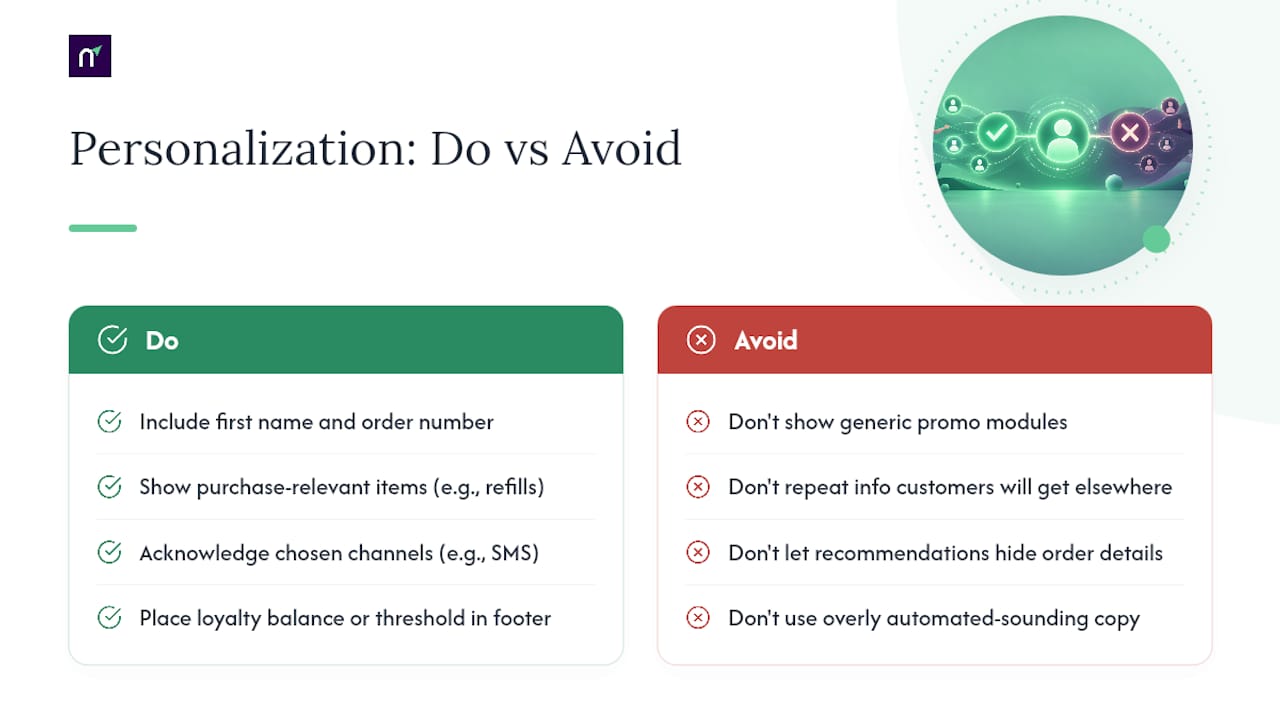
Dynamic content blocks that reflect the customer's actual purchase history work better than generic "you might also like" modules. If someone bought a espresso machine, showing filter refills makes sense; a random discount banner does not. Respecting stated preferences matters just as much: if a customer opted into SMS delivery alerts at checkout, the confirmation email should acknowledge that, rather than repeating information they'll get by text anyway.
Loyalty and account context add real value when placed correctly. Showing a customer's current loyalty point balance, or how close they are to a threshold, works well in the footer of a confirmation because the customer is already checking the email, not because you interrupted them to say it.
One caution worth taking seriously: over-personalized, obviously automated copy can backfire. Research on ecommerce communication has found that heavily automated messaging can read as impersonal or even manipulative if it feels anonymous or overly algorithmic, which undercuts the trust a confirmation email is supposed to build. Keep the brand voice human, keep the sender name recognizable, and don't let dynamic content blocks crowd out the actual order details. A recommendation carousel that pushes the price breakdown below the fold has failed at the email's real job, no matter how relevant the recommendations are.
Localizing Confirmations for International Customers
A confirmation email written for a US customer and sent unchanged to a customer in Japan or Germany will get the currency format wrong, the date format wrong, and possibly the tone wrong too. Localization for transactional email goes beyond translating the subject line.
Currency and number formatting need to match the recipient's locale, not your default template locale. €1.234,56 and $1,234.56 use the same digits in a different order, and rendering the wrong one erodes trust in the accuracy of the whole order. Date formats carry the same risk: 03/04/2026 means March 4 in the US and April 3 almost everywhere else, so spelling out the month name avoids the ambiguity entirely.
Language selection should follow the customer's stored preference or checkout locale, not their billing country, since those two frequently diverge for expats and gift purchases. Address formatting also varies meaningfully. Postal code placement, region naming, and even the order of address lines differ by country, and a template that assumes a US-style address block will render oddly for a shipping address in the UK or Japan.
Support contact information deserves a local touch too. A support link that only offers a US phone number and English-only hours frustrates a customer in a different time zone. Where volume justifies it, offering a local-language support channel or at minimum stating response-time expectations in the recipient's time zone closes that gap.
Connecting Confirmations to Your Order Management and CRM
An order confirmation email doesn't exist in isolation. It's one output of a pipeline that starts in your order management system (OMS) and often needs to sync with a customer relationship management (CRM) platform for support and marketing context.
The OMS is almost always the trigger source. When an order status changes, that event should fire the confirmation email automatically rather than through a manual export or batch job, since batch processing is exactly what introduces the delay that increases customer doubt. Real-time event triggers, via webhooks or a message queue, keep the email in sync with the actual order state.
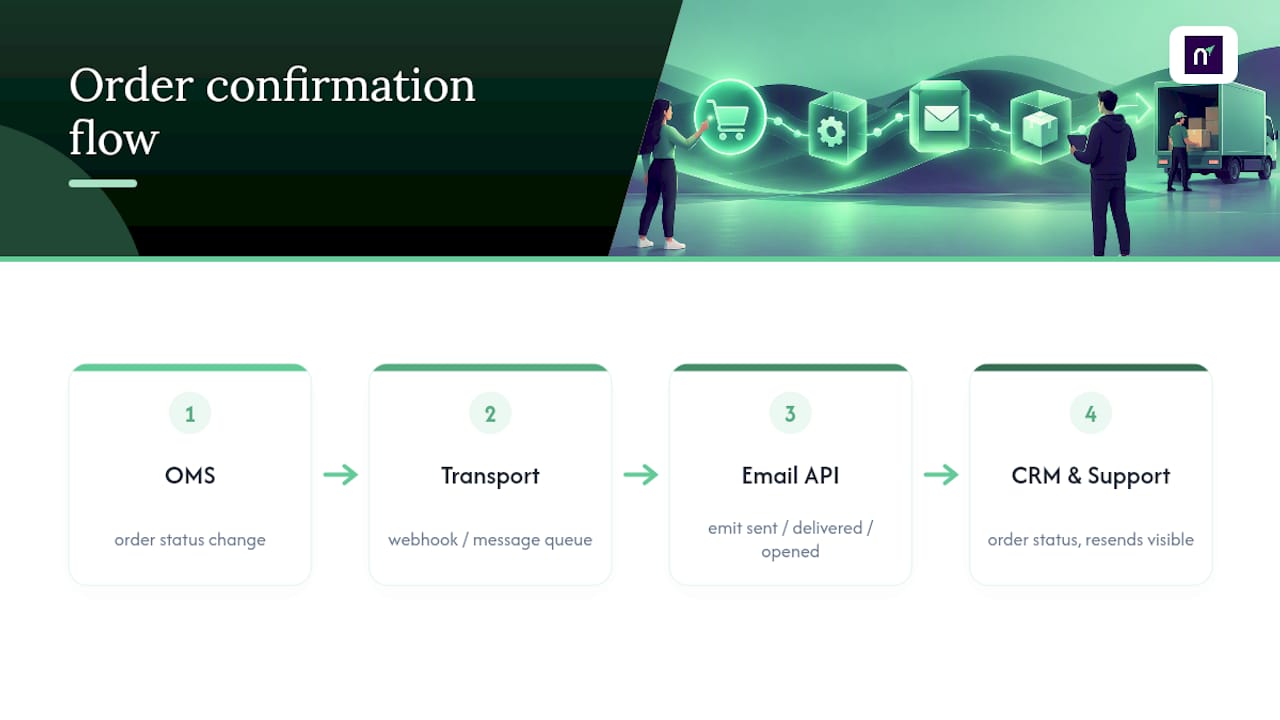
CRM integration matters most for support. When a customer emails asking about order #48213, having that order's confirmation status, delivery events, and any past resends visible directly in the CRM record saves an agent from digging through logs or asking the customer to forward the original email. That single view also lets marketing teams see which customers had a rocky confirmation experience (multiple resends, delayed delivery) before targeting them with a win-back campaign, which is a much smarter segmentation trigger than order value alone.
The technical connective tissue here is usually an API. A transactional email platform that exposes clean webhook events for order-created, sent, delivered, and opened states makes OMS and CRM integration dramatically simpler than trying to reverse-engineer status from inbox behavior. Get that data model right once, and every downstream system (support, CRM, analytics) inherits reliable order state without extra engineering work.
An Editorial Take on Speed, Clarity, and Deliverability
Most order confirmation advice treats copywriting and infrastructure as separate problems, one for marketing, one for engineering. That split is the actual source of most broken confirmation flows. A gorgeously designed template sent from an unauthenticated domain lands in spam. A perfectly authenticated email with a missing order total generates a support ticket anyway.
The teams that get this right treat the confirmation email as a single system: copy, design, and deliverability engineering built together, not handed off in sequence. That's the same logic behind pairing a transactional email API with signed webhook events and suppression handling in one place, rather than stitching together three vendors and hoping the seams hold. If you're rebuilding your confirmation flow, start with the order confirmation use case documentation, not the template gallery.
— Paul
Sending Order Confirmations Without Building Your Own Infrastructure
Most teams patch together a marketing email tool for campaigns and a separate transactional relay for confirmations, then wonder why suppression lists don't sync and a bounced address on one system keeps getting emailed by the other. The messaging platform runs both through one API, so a suppressed or bounced contact stays suppressed across marketing sends and order confirmations alike, without a manual export between systems.
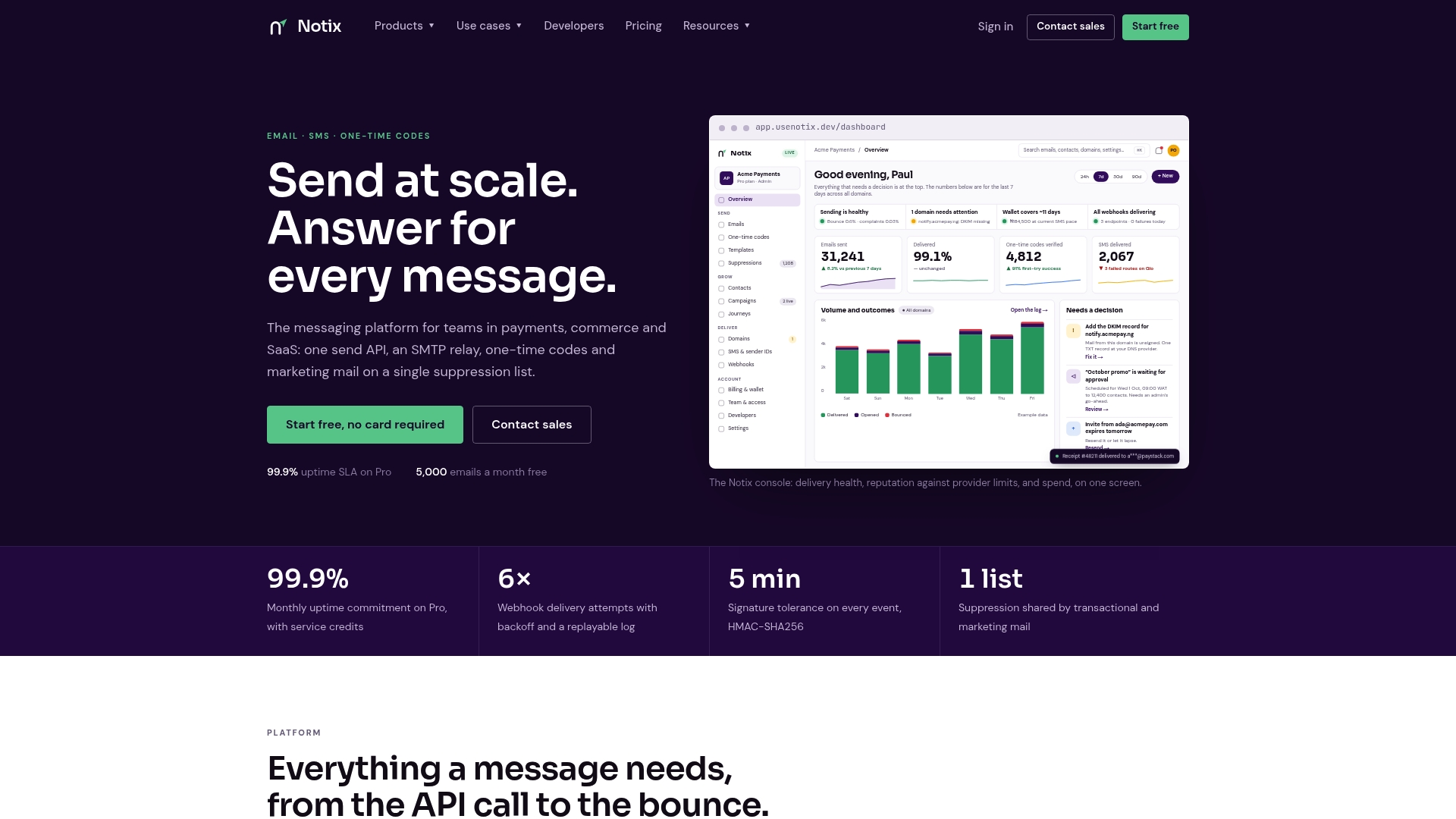
Developers can wire up the Email API or route through SMTP relay depending on how the rest of the stack is built, and pricing stays visible upfront rather than buried behind a sales call.
Start with the free plan to test your first confirmation flow end to end, order placed, webhook fired, email delivered, before deciding whether the Pro tier's volume fits your order flow.
Sources
- Sustainability (MDPI) article on ecommerce communication
- Order Confirmation Emails Best Practices | Braze
- AI-mediated communication in e-commerce: implications for customer trust (research paper)
- Litmus order confirmation template and engineering notes
- Klaviyo: Order confirmation email tips & examples
FAQ
What Is an Order Confirmation Email?
An order confirmation email is the automated message sent right after a customer completes a purchase, confirming the order number, items, price breakdown, and delivery details. Its purpose is to reassure the buyer the order went through and tell them what happens next.
How Do I Confirm an Order via Email?
Trigger the email immediately when the order is placed in your system, populate it with the order ID, itemized summary, price breakdown, delivery estimate, and a single clear CTA to view or track the order. Route the send through an authenticated domain with SPF, DKIM, and DMARC configured correctly so it reaches the inbox rather than spam.
Why Am I Getting Order Confirmation Emails I Didn't Expect?
A few explanations are common: someone mistyped your email address at checkout, a legitimate order was placed by a family member using a shared account, or the message is a phishing attempt spoofing a real retailer. Avoid clicking any links in a suspicious confirmation and instead contact the retailer through contact details you find independently.
Can You Provide Examples of Order Confirmation Emails?
A strong example opens with "Order #48213 confirmed" as the subject, followed by an itemized product list with images, a price breakdown, delivery window, and one CTA button reading "Track Order." Retail, B2B purchase orders, and subscription renewals each adjust that base template slightly, swapping the CTA and adding fields like PO numbers or renewal dates where relevant.
What Does Notix Charge for Sending Order Confirmation Emails?
Notix offers a free plan and a Pro plan at $15 per month, with an Enterprise option for higher volume available on request. Full details are on the pricing page.